
The vehicle identification number (VIN) is a unique serial number that can reveal a lot about a vehicle. In some cases, it can point you toward the transmission setup. A quick VIN check can help you access these specifications and verify accuracy before relying on the information for repairs or service decisions
Can a VIN tell you the transmission?
- Sometimes, but not always. It depends on the manufacturer, model, and model year.
- The most reliable workflow is: decode the VIN → then confirm using the transmission code/tag on the vehicle.
- If you only need manual vs automatic, a quick cabin check (pedals + shifter markings) is usually faster than decoding.
- For parts, fluids, or replacements, you’ll need the exact transmission ID/code (more specific than “automatic”).
- Use your build sheet (factory build data) or the window sticker (Monroney). They may confirm the original transmission option. Then, verify with the transmission ID tag/code for parts.
If the VIN result conflicts with what you see, the vehicle may have had a swap, the listing may be wrong, or the decoder data may be incomplete. To verify the factory configuration, cross-check OEM build/equipment data where available (Ford window sticker lookup, Toyota VIN specifications), then confirm the exact transmission using the physical transmission ID code/tag on the transmission itself.
Transmission System Basics
A transmission transfers power to the wheels. With its help, the vehicle can operate across different speeds and loads. The main categories most drivers encounter are:
- Manual transmissions.
- Automatic transmissions.
- Continuously variable transmissions (CVTs).
Modern vehicles may use various systems. These are:
- Traditional automatics.
- CVTs.
- Dual-clutch transmissions (DCTs).
- 8-10 speed automatic transmissions.
The exact type affects service procedures, fluids, and part compatibility. VIN tools can help narrow down the drivetrain configuration. However, they may not always list the transmission precisely. The safest approach is to use VIN decoding as a starting point and utilize the transmission ID code/tag.
Why Knowing Your Transmission Is Important
Transmission identification isn’t trivial - it affects real decisions. The type you have changes service requirements and fluid specifications. Knowing “manual vs automatic” is helpful, but for ordering parts or fluids, you usually need a more exact match. Getting this right also helps you talk to a mechanic without guesswork and can prevent expensive “almost fits” mistakes.
It also supports safer, smoother driving. If you realize how your transmission behaves, small warning signs stand out sooner. These may be odd shift timing, new noises, slipping, or delayed engagement. Avoid costly repairs and prevent issues early.
Manual vs Automatic: How to Tell the Difference?

The simplest split is how shifting happens. With a manual transmission, the driver selects gears using a shifter and clutch. An automatic system lets the vehicle handle gear changes on its own. In most passenger vehicles, it typically doesn’t use a clutch pedal in the cabin. The presence of a clutch pedal is a clear sign of a manual vehicle.
If your main question is “what kind of transmission do I have?” start by confirming manual vs automatic. Next, refine “automatic” into traditional automatic vs CVT vs dual-clutch by checking the owner’s manual/spec sheet and the transmission ID code/tag - those identifiers are more specific than the VIN alone.
Automatic transmissions usually have a gate or selector with familiar positions like park, reverse, neutral, and drive. Manuals won’t show the same layout. Documentation can help too. The owner’s manual and spec pages often state the transmission type. Sometimes the fluid spec gives another hint.
Visually Identifying the Transmission
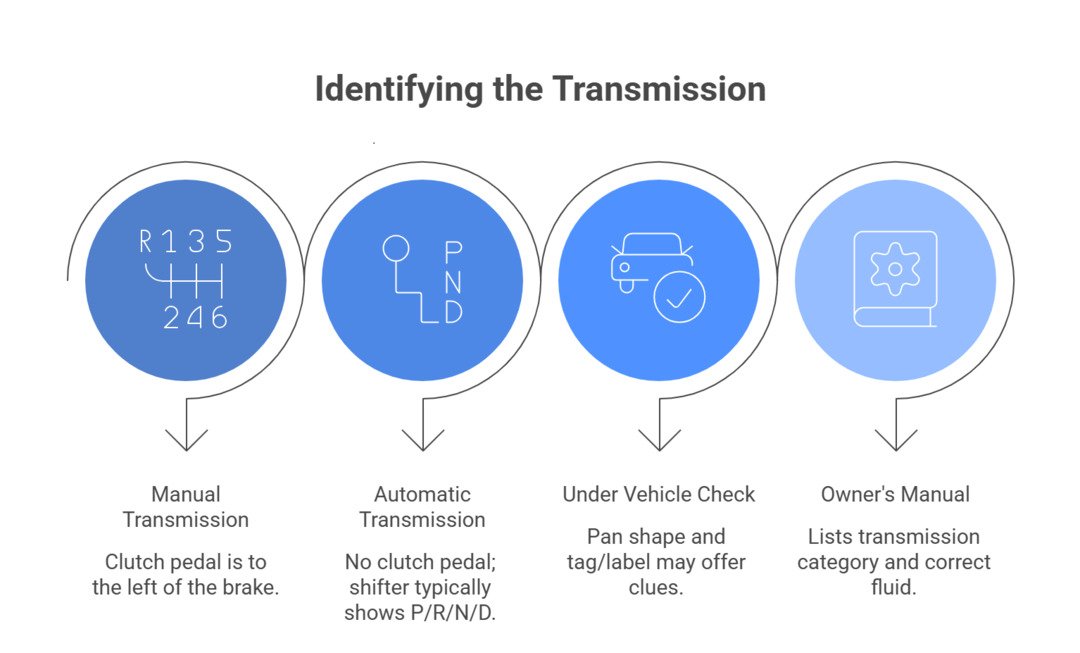
Performing a quick visual check may supplement VIN decoding.
- Manual: look for a clutch pedal (to the left of the brake).
- Automatic: no clutch pedal in the cabin.
- Check the shifter area: automatic layouts commonly show positions like P, R, N, D.
- Under the vehicle, the transmission pan shape and label/tag placement can offer hints (this varies widely).
- The owner’s manual usually lists the transmission category and the correct fluid type.
If you need the exact transmission model (not just “automatic”), look for the transmission tag/label. Alternatively, find a stamped code on the transmission housing. That code is often the most reliable way to confirm the transmission variant when VIN tools are unclear.
How to Identify Your Transmission (Step-by-Step)
You’ll need:
- Your VIN (photo).
- A phone camera + flashlight.
Ensure access to an owner’s manual (digital is fine) or a VIN report/decoder.
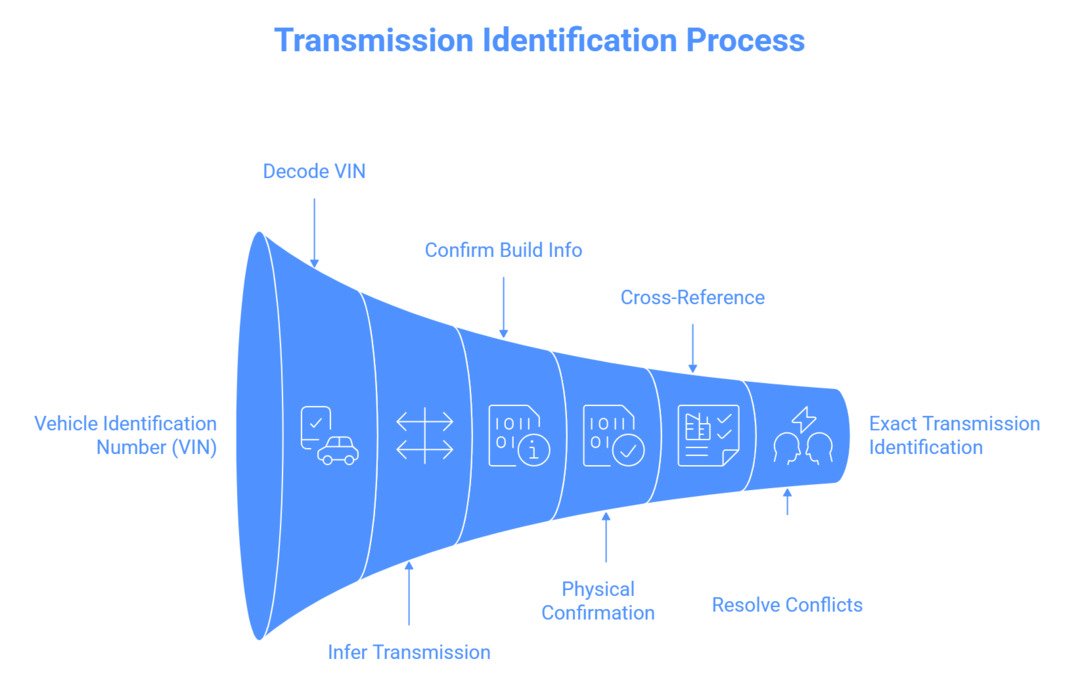
- Find your VIN. Review the dashboard and driver door jamb. Check your paperwork.
- Decode the VIN utilizing our VIN decoder. Note any transmission-related fields.
- Confirm manual vs automatic in the cabin. Make sure the clutch pedal is present/absent + shifter markings such as PRNDL.
- Check the owner’s manual/spec page for the transmission category and the specified fluid.
- Look for the transmission ID code/tag/stamp on the transmission housing and record it. A clear photo helps in this case.
- Cross-reference the transmission code. Use OEM parts/build data (or a dealer/qualified shop) to confirm the exact model.
- Resolve mismatches (VIN result vs physical code). Check for signs of swaps and use vehicle history/build information.
- Use the confirmed transmission code when buying fluid, filters, or ordering a replacement to avoid fitment errors.
Can I Determine the Transmission Type Using the VIN Alone?
What is the Transmission code/Transmission ID: The transmission code is the manufacturer’s marker for the car’s specific transmission model.
Why it matters: It’s usually more precise than “automatic/manual” and helps ensure correct fluid, filter, and replacement fitment.
Where to find it: Often on a tag/label/stamp on the transmission housing, and sometimes in OEM build/option data.
The VIN can help you identify a transmission sometimes, but it’s not a guaranteed method across all makes and model years. Many decoders may infer based on trim/build data, and some vehicles simply don’t encode the transmission in a way that’s exposed by basic tools. For a confident match, especially for parts or replacement, use VIN decoding as a starting point and confirm the exact transmission with the transmission ID code/tag.
The VIN is also useful as a “key” for build information. Depending on the tool and the manufacturer, you may see drivetrain and equipment details. They suggest what was installed from the factory. That means VIN decoding can narrow the possibilities, but it may not always name the exact transmission model with certainty.
If you want higher confidence, combine sources. A vehicle history report can sometimes show prior major repairs, and owner communities or enthusiast forums may point out where a manufacturer hides transmission identifiers on a specific model.
Put together, VIN decoding + physical ID + build/parts data is the most dependable path.
| Goal (What you need to know) | Best method | Where to find it | Certainty level |
| Manual vs automatic | Pedal check + shifter markings | Cabin (pedals/console) | High |
| Automatic type (traditional auto vs CVT vs DCT) | Owner’s manual/spec sheet | Manual/OEM spec page | Medium to High |
| Exact transmission model/variant | Transmission ID code (tag/label/stamp) | Transmission housing | Highest |
| Confirm build configuration | VIN report/OEM build/parts data | Online/dealer/OEM | Medium to High |
| Suspected swap or mismatch | Compare VIN data vs physical code + history | Inspection + history/build info | Investigative |
Ways to Improve Your Transmission Match Rate

What to collect for an accurate transmission match:
- VIN (17 digits)
- Year / Make / Model / Trim
- Engine code or engine size
- Drivetrain (FWD/RWD/AWD/4WD)
- Photo of the transmission tag/code/stamp (if accessible)
- Option/build data (where available)
- Notes on any signs of a swap (non-OEM shifter, mismatched labels, inconsistent listings)
- Your goal: fluid service vs repair vs replacement (changes what details matter)
To improve your hit rate, start with the owner’s manual - it usually states the transmission category and fluid spec. Next, find any ID marking on the transmission itself and capture it clearly (a photo is best). If you’re still unsure, a dealer lookup or a qualified shop can cross-reference the code against OEM parts/build data. Also consider related build factors - engine, drivetrain, and trim - since these often correlate with the transmission options offered for that vehicle.
Takeaways
- A VIN can help identify the transmission sometimes, but it’s not universal across all makes and model years.
- The quickest first step is confirming manual vs automatic using pedals and shifter markings.
- For parts, fluids, or replacements, confirm the exact transmission model using the transmission ID code/tag.
- Use the owner’s manual/spec sheet to refine “automatic” into traditional automatic vs CVT vs dual-clutch.
- If VIN results conflict with the vehicle, suspect incomplete decoder data or a prior swap and verify using physical codes + OEM build info.
- Record the transmission code (photo) before ordering components to reduce fitment mistakes.
- Tool: NHTSA’s VIN decoder (official U.S. VIN decoding resource).
- Reference: Understanding an NMVTIS Vehicle History Report (helps interpret history data our reports include).
Further reading
Frequently Asked Questions
Sometimes. Some VIN tools show transmission details, but results vary by make, model, and model year, and some tools infer data from trim/build information. When it matters for parts or replacement, confirm using the transmission ID code/tag.
Yes, the VIN can provide a wealth of information about your vehicle, including the model year, body type, engine type, and sometimes the transmission type. Various online tools and databases allow you to enter your VIN and retrieve these details. Additionally, the VIN is often linked to databases that can reveal the entire history of the vehicle.
The numbers stamped on a transmission are typically part of a stamped code, which includes the transmission type, manufacturing date, and sometimes the vehicle type it is designed for. This stamped code can be used to identify the exact model and specifications of the transmission, providing valuable information for repairs or replacements. Additionally, these numbers may correspond to specific gear ratios and other technical details vital for ensuring the transmission matches the engine's performance requirements.
Start by confirming manual vs automatic (clutch pedal + shifter markings). Then refine the category (traditional automatic vs CVT vs dual-clutch) using the owner’s manual/spec sheet.
There isn’t one universal VIN digit. Some manufacturers encode drivetrain/transmission details in specific positions. However, the location varies by brand and model year.
You can identify a lot without driving. Check for a clutch pedal (manual). Look at shifter markings (often PRNDL for many automatics). Verify details in the owner’s manual. For exact identification, locate the transmission ID code/tag on the transmission itself.
The transmission ID is often on a tag/label or a stamped code on the transmission housing. The exact location varies by vehicle, so use a service guide for your make/model or have a shop confirm it - taking a clear photo of the code helps.
The VIN belongs to the vehicle, not the transmission. Transmissions typically have their own model identifiers and serial numbers. They are used to confirm the exact unit. For fitment and parts matching, the transmission code/ID is usually more useful than general VIN decoding.
This can happen due to a prior transmission swap, listing/spec errors, or incomplete decoder data. Compare VIN report results with the physical transmission ID code, and use OEM build/parts data to resolve the mismatch confidently.